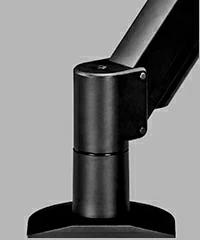
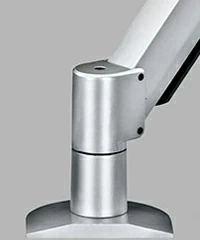
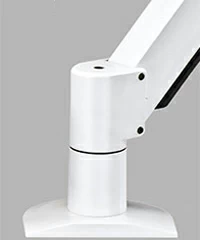
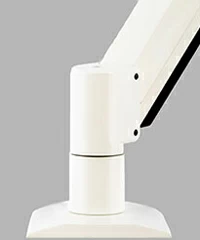
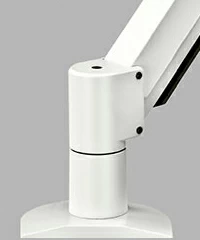
COLORS

Color options vary from product to product and are listed on each product's purchase page. The most common available color is black. Items in black are often stocked in high quantities and available for immediate shipment. Custom colors and private label branding are available with certain products in specific quantities.  Contact Ergomart to discuss your custom color requirements.


Color Options - Ergomart
 
TILTERS

There are three basic variations of the tilter mechanism: Standard, Spring and HD Spring.  Most of our lifting arms are offered with one or two versions.


Since monitor and device weights frequently fall into overlapping tilter head mechanism weight capabilities, two factors guide the user when selecting the more appropriate tilter mechanism: monitor thickness and frequency of adjustment.  Touch-screens, iMacs® and all-in-one PCs tend to be front heavy or thicker. Also, the addition or use of a thin client bracket between the monitor and tilter mechanism can dramatically change the overall effective depth.


The thicker the device(s), the greater the lever force delivered by the monitor. If you plan to adjust the tilter frequently and are using a heavier monitor, opt for the stronger spring tilter head — either a spring or HD spring tilter depending on the offered options.


A flat screen monitor that weighs 22 pounds and is fairly slim can typically be accommodated by the standard or spring tilter head. If you plan to tilt it frequently, you should choose the HD spring tilter option to enhance ease of use if it is offered with your selection.


All three tilter mechanisms have the same range of motion and use a friction resistance set screw that is tightened and loosened to accommodate the desired degree of effort the user needs to exert to move the monitor from one tilted angle to the next.  The tilter mechanisms with springs add rotational lift to work against the monitor tilting forward.


*not compatible with SAA66 and SAA2321


Tilter Heads - Ergomart
VESAs

VESA is an acronym for the Video Electronics Standards Association. The association consists of over 300 member companies who work together to set the technical specification standards for the video electronics market. These standards keep the industry stable and shape the future of video electronics and components.


Among the technical specifications defined by VESA are the VESA MIS, or VESA Mounting Interface Standard. The Mounting Interface Standard is a system that determines the international standards of how flatscreen monitors and other electronic devices are mounted. The MIS is dependent upon a hole pattern that is built into the monitor's design. This hole pattern is typically located on the back of a monitor. These hole patterns can be square or rectangular. The patterns are defined by the lateral and vertical measurements, in millimeters, between the hole centers. For example, the 75 x 75mm hole pattern measures 75mm between the hole centers of the pattern when measured across or up and down, not diagonally. "Out of the box" most monitors have an included stand or mount attached that is concealing the VESA standardized hole pattern.


VESA MIS labels are defined by the size of the screen and weight of a monitor. The VESA MIS standard is comprised of six ranges. The most common monitor sizes found in the home or workplace fall within three VESA MIS sizes. Additional VESA MIS sizes are set to define devices smaller than any currently carried by Ergomart. Ergomart offers mounting solutions for the following:


VESA MIS D is for monitors with a diagonal screen size between 12 and 22.9 inches and with a weight of up to 30.8 pounds. VESA MIS D monitors often either have 75 x 75 or 100 x 100mm hole patterns.


VESA MIS E is for monitors with a screen size between 23 and 30.9 inches and a weight of up to 50 pounds. VESA MIS E compliant monitors should have a 100 x 200mm hole pattern.


VESA MIS F is the standard for monitors with a diagonal screen size from 31 up to 90 inches and a weight of up to 250 pounds. Because VESA MIS F covers such a wide range of large monitor sizes, the VESA hole patterns associated with this group range in size as well. Generally 200 x 200, 200 x 400 and 400 x 600mm hole patterns are among the more common from this group.


Across the Ergomart website you will find the VESA MIS hole patterns being referred to simply as VESA hole patterns.


*not compatible with SAA66
VESA 75 x 75 - 100 X 100 VESA 100 X 200 VESA 200 X 200 VESA 200 x 400
VESA from 100 X 300
up to 400 x 600
Sliding VESA 75 x 75 Sliding VESA 100 x 100 Sliding VESA 100 x 200
ARM CAPACITY

Some of our articulating lift arms have multiple capacity ranges. Generally, most of our lifting arms are offered with three cylinder options. The lifting arms will be otherwise exactly the same. It is very important for the weight of the monitor(s) or device(s) to be attached to the arm be accurately weighed or verified (without stands or additional equipment attached) so that the correct arm capacity can be selected. If an arm is rated for 10 to 25 pounds and a monitor that actually weighs 8 pounds is attached, the arm will not lower and stay at the lowered position when released; it will simply float back up to its highest position. If the same arm is overburdened with a 27 pound monitor when only rated up to 25 pounds, then the arm will never suspend the payload without drifting slowly in to the lowest position. If you have difficulty determining the weight of your monitor, touch screen, iMac, all-in-one computer or other device(s), contact Ergomart for assistance. The gas spring cylinder will likely need to be re-adjusted once every three years. This is a simple adjustment that will take less than 30 seconds and restore the arm to the same balancing power as the day it was originally placed into service. We recommend that the allen wrench(es) provided with the original kit are kept for this purpose.


Arm Capacity - Ergomart
MOUNT KITS

Ergomart offers a broad range of mounting options. Kit A and Kit C are the most popular kits.  Either of the two adaptable mount kits can be configured as a desk clamps, wall mounts, through-desk mounts and box edge mounts. Other available mounting kits are designed for specific uses and/or specific products. A complete list of all available mounts and their specifications can be found on the mount purchase page noted below. If you are buying a mount as a retrofit to an existing installation, check with Ergomart to insure your replacement is compatible.  If you see that the mount you wish to use is offered with the product you already own then you can purchase the new mount kit from the page noted below.


Most Ergomart Mounting Arms and Stands that begin with the letters SAA, SA and LS are compatible with more than 15 mounting solutions. 


Additionally, Ergomart will work with customers to develop custom mounting solutions designed to meet specific needs.  Several unadvertised mounting solutions exist that can be applied to meet atypical situations.  Contact Ergomart today if you do not see the solution that meets your requirements.


*These Ergomart mounts do not come with fasteners to fasten to a wall or vertical surface.  Installer must supply screws and bolts depending on the conditions and requirements of the given installation


*not compatible with SAA66 and SAA2321


Small Flexible Mounting Kit A desk clamp
Kit A Mount
This small flexible mounting kit handles standard arms such as the SAA7000 or the SAA2045. The flexible mounting kit can be used in several different configurations (as seen in the specifications.) It can be assembled as a desk clamp mount, a wall mount, a thru-desk mount or a reverse wall mount (can also be used as a box edge style attachment).
Flexible Mounting Kit C desk clamp
Kit C Mount
This mount has a broader base plate and deeper column than the Flexible Mount Kit A making it more ideal for heavy-duty and long-reach arms. Adding the Flexible Mount Kit C to standard-duty arms, such as the SAA7000 or the SAA2045, allows for use of extra lateral or heavy-duty extensions. This mount is easily configured as a desk clamp, wall mount, or thru-desk mount. Because this mounting kit often handles long reach or heavy loads, using a Heavy-Duty Wall Mount or a Heavy-Duty Thru-Desk Mount should be considered over using the wall mount configured Flexible Mounting Kit C. For questions about which mount best fits your application call 888 420 3200.
Heavy Duty Wall Mounting Kit D
Kit D Mount
The Heavy Duty Wall Mount provides a strong mount that allows even the longest of Ergomart's Heavy Duty monitor arms to manage heavy loads. Call Ergomart with your questions when selecting the appropriate mount.
Heavy Duty Pole Mounting Kit E
Kit E Mount
Ergomart's Pole Mount works for poles with outside diameters (OD) between 1.5 and 2 inches diameter. This is a heavy-duty product and will stand up to the toughest environments. Position the clamp and secure it with four socket head cap screws. Use multiple HD Pole Mounts to create custom pole mounted workstations.
Heavy Duty Track Mounting Kit F
Kit F Mount
This product is designed to fit Ergomart's Extended Capacity Wall Track. It is a fixed mount component that allows freedom to expand, adapt and upgrade your workstation. The EC track systems feature a stylish and clean look highlighted by wire management, end caps and other accessories that keep wire and cables completely hidden, managed and contained. See the EC Track Accessory page for full details.
Heavy Duty Thru Desk Mounting Kit G
Kit G Mount
The Thru Desk mount uses a bolt and square washer to secure a Heavy duty mount to a work surface. The standard bolt allows the mount to clamp on to surfaces up to 1.125" thick. Please call to substitute a longer bolt if needed for thicker work surfaces.
Slatwall Mounting Kit H
Kit H Mount
This mount is designed to fit most slatwall panels and fixtures. Please call for specific questions regarding the Slatwall Mount and its specifications.
 
Dual Heavy Duty Pole Mounting Kit J
Kit J Mount
The Dual Heavy Duty Pole Mount works for poles with outside diameters (OD) between 1.5 and 2 inches diameter. This is a dual version of the Heavy Duty Pole Mounting Kit E. The Dual Pole Mount allows use of most Ergomart articulating monitor arms and other Ergomart Extensions and Straight Mounts to mount on a single pole at the same height. Use multiple single or dual Pole Mounts to create custom pole mounted workstations.
Thru Desk Column Mounting Kit J
Kit K Mount
This thru desk mount has no base giving the mount a low profile. The column mounts to surfaces up to 1.75" thick using a bolt and rectangular washer. Longer bolts available through special order.
Dual Desk Mounting Kit L
Kit L Mount
Mounting Kit L allows users to mount two arms to one mount. The mount itself clamps to horizontal surfaces up to 2" thick. Mounting Kit L can be used as a desk clamp, thru desk, grommet hole and box edge mount.
Roller Track Stationary Mounting Kit M
Kit M Mount
Mounting Kit M allows users to mount a stationary arm or equipment holder to the roller track. The mount's back plate is designed to slide into the roller track. Four set screws fix the mount at any point along the track. The mount when purchased with shaft collars can be used to hold a pole - allowing for placement of peripherals above and below the mount, along the pole. Mounting Kit M is an economical mounting solution for roller track users who do not need a rolling mount.
Gliding Mounting Kit For The Roller Track
Kit N Mount
Mounting Kit N glides along the length of the RT Track.  The Kit N Track Mount is solely designed to affix to the a horizontally mounted Heavy-Duty RT wall track.  The RT track is currently only available for order through an Ergomart customer service and sales person.  Mounted monitor arms and equipment can be moved effortlessly along a horizontal Roller Track that can be custom ordered up to 21 feet. Sturdy bearing allow heavy loads to be moved smoothly on the mount. Mounting Kit N will accept pole arms such as the 9137 line when purchased with shaft collars. This configuration allows for placement of peripherals above and below the mount. Mounting Kit N is a sturdy and practical design that adds movement to mounted components and entire workstations.
 
Gliding Mounting Kit For The Roller Track
Kit R Mount

The Universal Mount Kit R features a 1.5" x 2.75" hole pattern that allows users to create custom and adapted interface solutions when mounted to vertical surfaces. It is cast from aluminum and machined for compatibility with most Ergomart monitor mounting arms* It accepts 4) ¼"-20 bolts with a maximum depth of .75 inches.

*Mount Kit R does not interface with: SAA66, SAA60, SAA2321, FSB600, FSB700

Gliding Mounting Kit For The Roller Track
Kit S Mount

The Heavy Duty Dovetail Mount Kit S provides a strong mount for use on healthcare equipment and furniture with dovetail track openings from 1 to 1.1 inches.  It is designed to evenly spread stress throughout the dovetail mount length of 5.25 inches.  Most Ergomart mounting arms are appropriate with this product.

Standard color choices include silver and black.  Matte white and light beige mounts may be special ordered with extended lead times and must be quoted by an Ergomart representative.  The back clamping components of our dovetail mounts are anodized a silver aluminum color that closely matches our metallic gray powder coat option.  Consult the equipment manufacturer regarding the strength of the dovetail rail and load ratings if you wish to install long reach or heavy items using the Kit S Dovetail.  Call Ergomart when you have questions regarding selecting the appropriate mount (888 420 3200).

Use this mount with many popular anesthesia carts, incubators, equipment booms and dovetail wall track configurations.  The Ergomart Mount Kit S Dovetail is not appropriate on tracks where the dovetail inset is below a larger secondary channel.

VERTICAL EXTENSIONS

The vertical extension is a great way to add vertical height to a new or existing Ergomart set-up or workstation. The vertical travel of a monitor arm can become restricted when mounted to a horizontal work surface or other obstacle. A vertical extension can set the arm higher on the mount, making use of the arm's full vertical range. When mounting some arms to a desktop or edge, vertical extensions can provide increased sit/stand functionality.


The 2” and 6” extensions are designed for use with a limited number of SAA and SA options.  The 5, 8 and 12 inch extensions will work with most Ergomart SAA, SA and LS products but are not compatible with Mount Kit A.  Please do not hesitate to contact Ergomart to discuss the benefits and limitations of various vertical extensions.


*not compatible with SAA66 and SAA2321


Vertical Extensions - Ergomart
HORIZONTAL EXTENSIONS

Ergomart's Heavy-Duty Mount Extensions extend monitor arm reach without sacrificing stability and strength. Add up to two feet of horizontal monitor extension to virtually all Ergomart LS, SA or SAA style products, including heavy-duty LCD monitor arms and wall mounted computer workstations. The standard extension  distances are 9.5, 15.5 and 23.5 inches.


There are two styles of horizontal extensions, Single and Dual pin.  The Dual pin design is recommended for heavier payloads and is incorporated into solutions that involve the EC Vertical Wall Track.  Typically, it is best to consult with an Ergomart representative before making a purchase involving an HD extension. 


*not compatible with SAA66 and SAA2321


Horizontal Extensions - Ergomart
KEYBOARD TRAYS

Below are many of Ergomart’s newer and most popular keyboard trays for monitor/keyboard arm combination kits and wall track solutions.  Other trays not shown below may be available for integration from our lineup of under-desk solutions.  Always contact Ergomart Sales and Service if you don’t see exactly what you require.


TRS20 Phenolic Keyboard Tray
20 inch wide
TRS26 Phenolic Keyboard Tray
26 inch wide
TRP Left Right Mousing
Tray Steel with handle

Simple, clean and exceptionally tough, the 20” x 8.5” wide phenolic tray easily handles virtually any keyboard.   Included Velcro® strips securely affix the keyboard. A wire management clip attaches to the back edge of the tray to manage wires.  A mini keyboard may allow room to add a mouse.  Mousetrap and additional clip may be purchased separately.

Rugged 26” x 8.5” wide phenolic tray allows space for a full-size keyboard.  The included Velcro® strips secure the keyboard to the tray.  The tray comes with two wire management clips and a mousetrap. This tray is useful for single user workstations. If left- and right-handed users will be accessing the keyboard at the same workstation, consider the TRAS24 or TRAS26.

User's keyboard rests in the center of the platform while a handy left/right gliding mouse tray can be instantly shifted to either side.  Velcro® strips hold the keyboard in place.  An included mouse pocket may be placed in one of several locations to stow the mouse.  The useable tray space is 18" x 8" and the mouse tray is 6.5" wide x 7" tall.

TRT27 27 inch Steel Tray
with Palm Rest
TRA18 Aluminum Keyboard Tray
18 inch wide
TRA20 Aluminum Keyboard Tray
20 inch wide

The beefy, powder-coated steel platform is designed specifically for use with the TR2818 arm.  It offers plenty of space for most combinations of keyboards and mousing devices and it features a comfy, full-width, padded foam palm rest and wire management slots at the back.*  The mouse and keyboard space is 27" x 8".

USA manufactured and completely recyclable, the 18” x 8.5” wide anodized aluminum tray easily handles most keyboards.   Included Velcro® strips securely affix the keyboard.  A wire management clip attaches to the back edge of the tray to manage wires.

The 20” x 8.5” wide aluminum tray easily handles virtually any keyboard.   Included Velcro® strips securely affix the keyboard.  A wire management clip attaches to the back edge of the tray to manage wires.  With 20” of width, this versatile tray can accommodate a 13” mini keyboard and a mouse.  If required, a mousetrap and additional clip may be purchased separately.

TRA24 Aluminum Keyboard Tray
24 inch wide
TRA26 Aluminum Keyboard Tray
26 inch wide
TRAS24 Aluminum Tray for left or right handed users - 24 inch wide

The 24” x 8.5” aluminum tray is designed for tighter spaces and has just enough space for a 17.5” wide keyboard and a 6.5” wide mousing area.   Velcro® strips securely affix the keyboard to the tray.  The TRA24 includes two wire management clips and a mouse trap.  If left- and right-handed users will be using the same computer, consider the TRAS24 or TRAS26.

26” x 8.5” wide aluminum tray allows space for a full-size keyboard and generous lateral room for mousing.  The included Velcro® strips secure the keyboard to the tray.  This tray comes with two wire management clips and a mousetrap.  If the workstation will be accessed by multiple users, consider the TRAS24 or TRAS26.

This compact 24” x 8.5” aluminum tray comes equipped with our ergonomic 17” sliding tray for instant access by left- and right-handed users.  The keyboard is securely attached with included Velcro® strips.  The 24” width is specifically designed for use with keyboards that are less than 17.5” wide.  We find that many users prefer a tray system that is as narrow as possible.  Also included are the Mousetrap and clips that secure cabling along the rear edge of the tray.

TRAS26 Aluminum Tray ambidextrous keyboard - 26 inch wide Removable Washable Medical Keyboard Tray System for left or right
handed use - 24 inch wide
Custom Keyboard system with mechanical latch system - 26 inch

The 26” x 8.5” aluminum tray is designed for standard 18” keyboards and has ample room for mousing with 8” of width.   Velcro® strips securely affix keyboard to the 18” wide slider tray.  Also included are the Mousetrap that captures the mouse when the tray is tilted up and clips that secure cabling along the rear edge of the tray.  To move the keyboard tray right to left, the user simply presses the edge of the keyboard tray with one hand and the keyboard with the other.

The 24” x 8.5” aluminum tray comes equipped with an ergonomic sliding tray for left- and right-handed users and includes your choice of many washable and medical environment keyboards.  Ergomart integrates the keyboard securely to the tray slider.   The slider tray features a mechanical fastening system that does not rely on tape or Velcro and allows the cleaning technician to quickly remove, wipe-down and re-integrate the keyboard.    Please contact Ergomart for more information if your organization has an interest in such a solution.

The 26” x 8.5” aluminum tray comes equipped with an ergonomic sliding tray for left- and right-handed users and features a fastening system that does not require tape or Velcro®.    This single feature is important in creating the greatest likelihood that the tray and keyboard can be sanitized to standards required in many medical environments.  Please contact Ergomart for more information.

Stainless Steel Handle Stainless Steel Handle TRP mousetray

TRA Anodized Aluminum Keyboard Trays are available with or without a stainless steel handle.

TRAS Aluminum Keyboard Trays with sliders are available with or without the stainless steel handle.

The TRP mousetray features antimicrobial mouse surface material and provides an ample  6.5" square mousing surface area.

Wire Management Clip Mousetrap Complimentary Mousepad

These small, handy friction-grip wire managers can be pressed tightly and firmly into place to ensure the keyboard or mouse wire(s) do not move under typical use.  The wire management clip is 2.3” wide and .76” deep and attaches to our ¼” thick phenolic and aluminum keyboard trays.

The Mousetrap captures the mouse as the keyboard is tilted into a vertical position.  Most standard mousing devices will fit in the mousetrap.  It attaches to .25” thick surfaces such as our aluminum and phenolic trays.  The mouse trap holds devices up to 1.75” tall and 5” long.

The Ergomart mouse pad is available as a free option when purchasing certain compatible keyboard trays.

The 7" x 8.5" mousepad is offered with our various 26” wide keyboard trays.  The 6.5" x 6.5" is offered with our 24 TRA and TRAS trays.

Mouse Pocket

The Mouse Pocket is a feature component of the TRP and TRT trays.  Use the included Velcro tabs to attach it to any appropriate vertical space on the assembly, including the tray bottom or even on the back of the monitor.  Attach wherever you have 5” of vertical and 3.5” flat space.

*The TRP and TRT27 trays are not compatible with Wire Management Clips or Mousetrap


HANDLES

Dual Handles - Ergomart Drop Down Handles - Ergomart
DUAL HANDLE

The 2H100 Dual Handle Bracket has one handle on each side of the LCD monitor to facilitate movement of the arm into any position. It accomodates most wide screen monitors up to 21" and fits on the following LCD Arms and Stands:SAA7000, SAA2415SAA2718SAA4228LS9109,  LS1512, and  LS9137.


Purchase 2H100 Dual Handle Bracket


DROP DOWN HANDLE

The single handle drop down monitor bracket can be inserted into most configurations with VESA 75mm or 100 mm standard hole patterns and with most Ergomart monitor arms.  An easy-to-grasp handle is centered under the monitor for instant adjustments.  This handle is used primarily as a means of moving a monitor quickly up and down.  Movement requiring lateral movement is often better accomplished with the dual handle monitor mover pictured below.


Many applications require a simple way for users to move an assembly up and out of the way and then back down. 


Purchase Single Drop Down Handles

Popular Items Also Available From Ergomart
Monitor Arm

SAA2415 Heavy Duty Arm


Heavy Duty SAA2415

One of our toughest (yet attractive) LCD monitor arms! The SAA2415 floats big LCD monitors, LED displays, touch screens and even small flat screen TV monitors up to 62 pounds.

Mounts with Keyboard Trays

TRS2718-BB103


Mounts with Keyboard Trays

The TRS2718-BB103 Monitor Arm Keyboard Tray Combo features excellent cable management and substantial reach.  It is appropriate for frequent adjustment of height (nearly 18" of instant, effortless vertical float) in extended positions.

Light Filters

Visibility Ergomart

Ergomart offers an extensive lineup of fluorescent light filtering products. Our filters virtually eliminate all UV wavelengths below 380 nanometers. We offer several versions of these lighting filters that offer various levels of beneficial properties.

Wall Track Mount

Heavy Duty Track COMBO 2


Wall Track Mount

Our COMBO 2 Data Entry System is a true Sit Stand LCD and Keyboard Track Wall Mounted Solution that can be configured for ADA compliance. In its base configuration, the COMBO 2 has two articulating arms with more than 15.5 inches of vertical travel.

Monitor Arm

SAA7000 Monitor Arm


Heavy Duty SAA2415

Our high-performance VESA compliant LCD-LED Arm handles your LCD monitors and touch screen monitors with ease. It is finely engineered and constructed from die cast and finely machined powder coated aluminum components.