THE TRP2718 DATA ENTRY MONITOR ARM WITH KEYBOARD TRAY

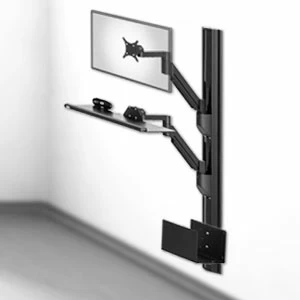
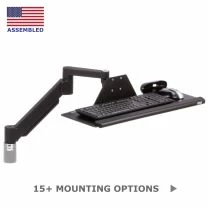
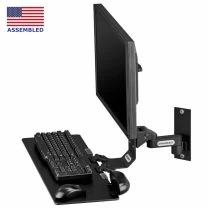
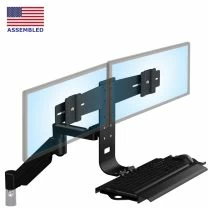
The TRP2718 Premium LCD Arm FlexTray is useful in space sensitive environments. It is an excellent choice for wall mounting for occasional data entry in both standing and sitting positions. This LCD Arm FlexTray assembly is used extensively in medical, dental, manufacturing and industrial work environments. The TRP2718 accommodates flat panel displays up to 20 pounds. The arm and tray rotate an amazing 360 degrees at three pivot joints while cables are routed through the arm. Both monitor and keyboard tray can be tilted at different angles. If you require greater reach or a combo that handles greater payloads, contact Ergomart at 888 420 3200. One more great feature: the arm can be folded so that when not in use it only protrudes about 7 inches from the wall.

TRP2718 Data Entry Monitor Mount Keyboard Tray Features


  • Arm reaches out a full 27 inches yet folds up neatly into 7"
  • Cable management controls cords through entire arm
  • Over 17.5 inches vertical travel when wall mounted
  • Effortlessly float your LCD monitor up to 20 pounds
  • Dual adapter bracket handles two monitors up to 8 pounds
  • Sit or stand & comfortably view your LCD
  • Please call for questions about vertical extensions
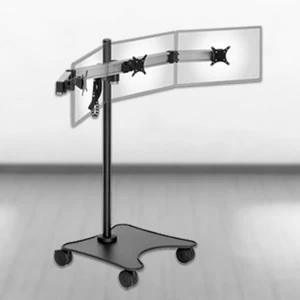
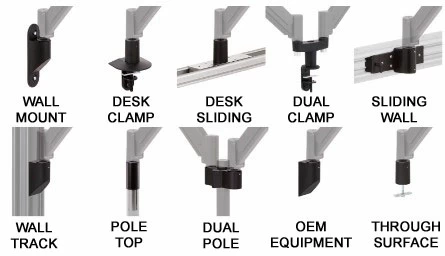
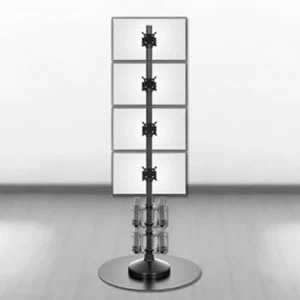
  • Compatible with our 192 Pole Floor Mount Systems
  • Colors: Black, Metallic Gray and Matte White
  • Comes with VESA 75mm and 100mm mounting holes
Shipping Weight 35 pounds
Shipping Dimensions 31 x 19 x 9 inches
Warranty 5 Year limited

Professional installation is always recommended for all wall-mounted Ergomart products. Improper installation may result in injury or damage. Consult Ergomart technical support regarding any mounting concerns or questions.
black    metallic gray    white
TRP2718 SINGLE Base Price (with Mount Kit G): $502.43
TRP2718 DUAL Base Price (with Mount Kit G): $564.47
Some options might change depending on previous selection
General Quick Reference BoxMonitor Mount references
ergomart checkout

Features
  • With its substantial range vertical motion of almost 18 inches and generous tilt, this keyboard tray - arm combo is hyper-adjustable!
  • Running out of room at your workstation? The TRP2718 Monitor Arm Keyboard Tray Combo opens up desk space with a simple lift
  • Left/Right Gliding keyboard tray allows instant access for either left or right handed users with no hassles
  • Great wire management allows you to route cabling conveniently through the arm to just above the mount
  • When table-mounted, this LCD arm can be lowered so that the keyboard tray is on or just above the surface
Adjustability

LCD Monitor Arm moves from 3.5 inches out to 27 inches and keyboard tray folds up neatly
Wall Mount: LCD Monitor Arm has vertical range of almost 18

Folds Tight and Reaches over 30"

The TRP2718 LCD Monitor Arm and Flextray Combo retracts to about 5.50" from wall and monitor face extends to about 30" inches. Both LCD arm and Flextray will fold neatly out of the way for space sensitive environments.

17.9" of Height Adjustment

When mounted on a vertical surface like a wall, the TRP2718 LCD Monitor Arm and Flextray combination has a vertical range of almost 18 inches. See the specification drawings to understand the height adjustability issues.

LCD Monitor Arm - More than 90 degrees of tilt with adjustable keyboard tray
LCD Monitor Arm - Screen swivels almost 360 degrees

Over 130 Degrees of Screen Tilt!

This product provides unmatched flexibility with the over 90° upward and 44° downward tilt. This feature allows fine tuning for glare reduction.

Screen Swivel Pivots almost 360°

Screen mount allows you to swivel the screen until monitor touches arm. Just another aspect of the flexibility of this data entry arm. 

LCD Monitor Arm - entire arm rotates 360 degrees
LCD Monitor Arm swings 360 degrees on its second joint
Rear Mount Rotation 360 Degrees

The entire arm swings 360 degrees on its base to move your monitor, meaning you can sit at either end of a 6 foot long work surface and easily view your monitor!

Arm Rotation Swivels 360°

The TRP2718 monitor arm swings 360° on its second joint (or elbow) for fine tuning and to help with adjustments to intermediate distances. 

Specifications

TRS2718 Wall Mount with high and low positons

ARM ADJUSTED TO FULL HEIGHT WITH BACKBAR ASSEMBLY ROTATED LEFT (WALL MOUNT)

This image depicts the arm wall mounted and in its highest position. Also depicted is how both VESA 75mm and 100mm monitor placement can be in either an upper position (13.13") or lower position (11.25"). The high position is about 12.75 inches above the tray.

The 2.5 inch measurement shows the vertical distance of the tray from the top fastener height of the wall mount.


Tilter head attaches to back bar shown with the wall mount

TILTER HEAD ATTACHES TO BACK BAR IN 3 LOCATIONS (WALL MOUNT)

There are three attachment positions for the tilter head to the LCD Keyboard Tray Arm.  They move the relationship of the arm to the backbar that hold both the tray and the monitor.  Most installations work best with the tilter attached to the lowest point on the backbar.  This is the preferred position because it reduces the stress on the tilter head component.  That position is indicated in the image to the left with the fully opaque lines.    Again, this same attachment position is also typically advisable when attaching the arm to a work surface as it will allow for the most vertical travel before the keyboard tray stops when it rests on the surface.


TRS LCD Monitor Arm Keyboard shown in highest position with the desk clamp

DESK CLAMP CONFIGURATION IN HIGHEST POSITION

This LCD monitor arm keyboard configuration illustrates the arm attached to the center of the back bar. Note that the center of the 75 and 100 mm VESA plate (which usually is also the vertical center of the monitor) can be located 11.25 or 13.25 inches above the tray.

The bottom horizontal line illustrates the surface height for a clamp, grommet or through desk configuration. The arm will have 7 inches of vertical travel when limited by the surface. When the arm is 2 inches away from the edge (as is typical when it is mounted at the front of a shallow shelf in a through-desk mounted configuration) then it can be floated through its full vertical range of over 17 inches.

Pole Mount LCD Monitor Arm in elevated position

POLE MOUNTED ARM IN ELEVATED POSITION

In this illustration, the tilter head is in its middle attachment position on the back bar. The horizontal line illustrates the plane where the face of the arm meets the top of the pole mount. This is instructive for the installation process and determining the vertical position of the monitor and tray heights.


Pole Mounted LCD arm and keyboard tray set at lowest position

POLE MOUNTED ARM IN LOWEST POSITION

The arm may be lowered with hand pressure to a position as illustrated. The tray in this configuration is able to move to almost 14 inches below the mounting plane of the arm to the pole mount


TRS2718 LCD Monitor Mount  with 2 inch extension in highest position

VERTICAL 2 INCH EXTENSION ON DESK MOUNTED INSTALLATION

Above the TRS2718 is shown desk mounted with the optional two inch extension placed in the highest position. Also note the maximum forward reach in the upper position. Variations are possible by attaching the back bar at the other two locations as discussed above "Tilter Head Attaches to Back Bar in 3 Locations."

These extensions are almost always used when the arm is attached to a large horizontal surface. Generally speaking, nothing is to be gained from using this device in a vertically mounted arrangement. Some situations do arise that require a vertical extension on a wall mount.


TRS2718 LCD Monitor Mount  with 2 inch extension in highest position

VERTICAL 12 INCH EXTENSION

Above the TRS2718 is shown desk mounted with the optional six inch extension floated to its highest position. Variations are possible by attaching the back bar at the other two locations as discussed above""Tilter Head Attaches to Back Bar in 3 Locations."

The maximum reach of the arm in its low position as it touches the surface is illustrated in the second image. Note that in all examples showing the arm in various positions that there is a relationship between the reach of the assembly and its vertical position. The maximum reach is always obtained at the point where the lifting arm and the forearm or both parallel to the floor. 

Please call us at 888 420 3200 or 214 742 6066 with questions.


Instructions

Monitor Mount with Keyboard Tray TRP2718
Product documentation and instructions can be viewed or downloaded here:

monitor mount TRS91 Instructions
Monitor Mount & Keyboard
Tray TRP2718 Instructions

monitor Mount TRS91 Instructions
Flex Mount Kit Instructions
Popular Items Also Available From Ergomart
Monitor Arm
SAA2415 Heavy Duty Arm
Heavy Duty SAA2415

One of our toughest (yet attractive) LCD monitor arms! The SAA2415 floats big LCD monitors, LED displays, touch screens and even small flat screen TV monitors up to 62 pounds.

Mounts with
Keyboard Trays

Mounts with Keyboard Trays

Monitor Arms, Monitor Stands and Monitor Poles with Keyboard Trays fort LCD and LED screens

Light Filters

Visibility Ergomart

Ergomart offers an extensive lineup of fluorescent light filtering products. Our filters virtually eliminate all UV wavelengths below 380 nanometers. We offer several versions of these lighting filters that offer various levels of beneficial properties.

Wall Track Mount
Heavy Duty Track COMBO 2
Wall Track Mount

Our COMBO 2 Data Entry System is a true Sit Stand LCD and Keyboard Track Wall Mounted Solution that can be configured for ADA compliance. In its base configuration, the COMBO 2 has two articulating arms with more than 15.5 inches of vertical travel.

Monitor Arm
SAA7000 Monitor Arm
Heavy Duty SAA2415

Our high-performance VESA compliant LCD-LED Arm handles your LCD monitors and touch screen monitors with ease. It is finely engineered and constructed from die cast and finely machined powder coated aluminum components.